Sending
Send email
The fields, limits and options of a send request.
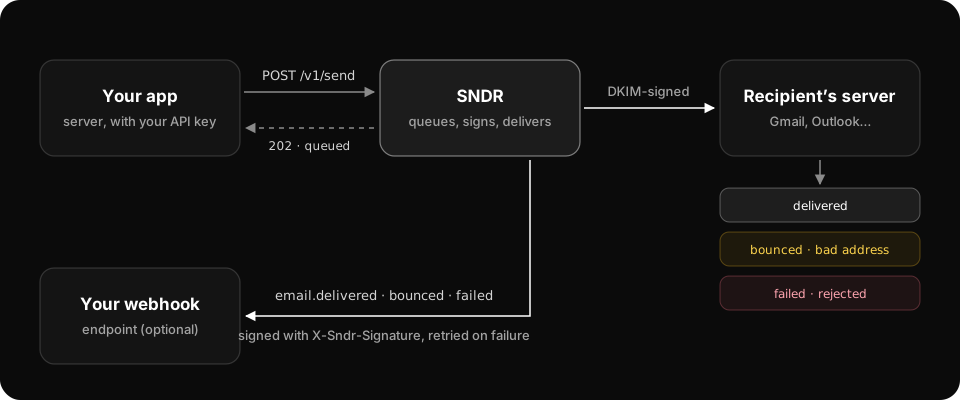
Send with POST /v1/send. The API answers 202 Accepted straight away and delivers in the background.
curl -X POST https://api.sndr.sh/v1/send \
  -H "Authorization: Bearer $SNDR_API_KEY" \
  -H "Content-Type: application/json" \
  -d '{
    "from": "Acme <hello@mail.acme.com>",
    "to": ["customer@example.com"],
    "subject": "Hello from SNDR",
    "html": "<p>It works.</p>"
  }'
Request fields
fromstringrequiredThe sender: hello@mail.acme.com or Acme <hello@mail.acme.com>. Its domain must be verified.
tostring[]requiredRecipients, 1 to 1,000 addresses. Always an array in the HTTP API.
ccstring[]Copied recipients, up to 100.
bccstring[]Hidden recipients, up to 100.
reply_tostringWhere replies go, if not to from.
subjectstringrequiredOne line, up to 998 characters. Optional when the template has a subject.
htmlstringHTML body. Send html, text or both.
textstringPlain-text body for clients that don’t show HTML.
template_idstringA saved template. Its subject and bodies fill any field you leave empty.
variablesobjectValues for {{name}} placeholders in the subject and bodies, e.g. {"name": "Sara"}.
attachmentsobject[]Files: { "filename", "content", "content_type" }, with content base64-encoded.
headersobjectExtra email headers, e.g. {"X-Campaign": "welcome"}.
Limits
| Limit | Value |
|---|---|
Recipients (to + cc + bcc) | 1,000 per request |
| Attachments | 10 files, 10 MiB total after decoding |
| Request body | 16 MiB |
| Subject | 998 characters, one line |
Retry safely
Add an Idempotency-Key header with a unique value, such as your order ID. A retry with the same key returns the first response instead of sending the email again.
-H "Idempotency-Key: order-1234-receipt"Suppressed recipients
Addresses on your suppression list (hard bounces, complaints, unsubscribes) are removed before sending. If every to address is suppressed, the request fails with suppressed.
Response
{
  "id": "eml_01HXKQ8B3N",
  "from": "Acme <hello@mail.acme.com>",
  "to": ["customer@example.com"],
  "subject": "Hello from SNDR",
  "status": "queued",
  "created_at": "2026-01-15T10:30:00Z"
}
status starts as queued and ends as delivered, bounced or failed. Read it with GET /v1/emails/{id}.