Get started
Authentication
Complete OAuth 2.0 Authorization Code flow with optional PKCE.
The Partner API uses OAuth 2.0 Authorization Code flow. Your backend never handles user credentials — SNDR manages login and the user grants permission on a hosted consent page.
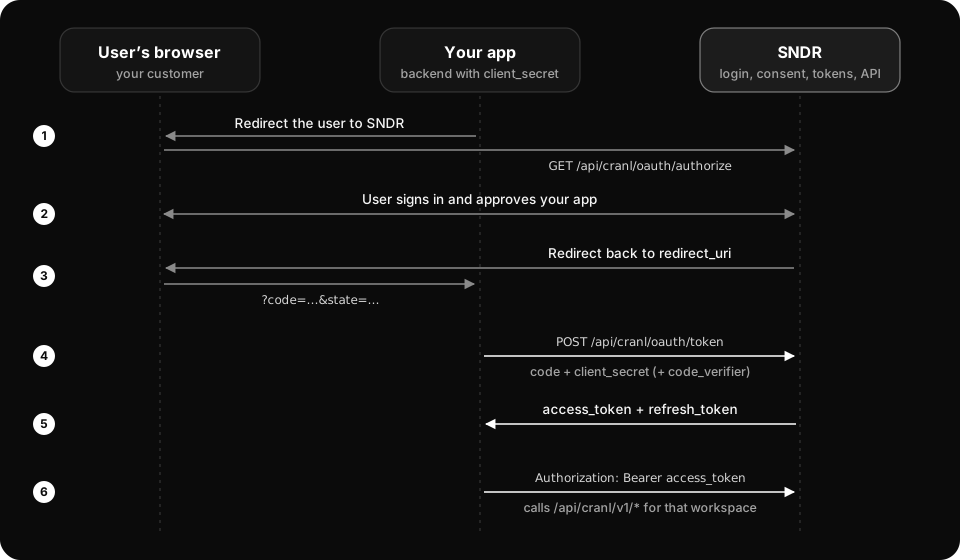
Step 1 — Redirect the user
GET https://api.sndr.sh/api/cranl/oauth/authorize
  ?client_id=sndr_your_client_id
  &redirect_uri=https%3A%2F%2Fyour-app.com%2Fcallback
  &failure_redirect_uri=https%3A%2F%2Fyour-app.com%2Ffailed
  &scope=read+send
  &state=random_csrf_token
  &code_challenge=BASE64URL_SHA256_of_verifier
&code_challenge_method=S256client_idstringrequiredYour app’s client ID (sndr_...).
redirect_uristringrequiredWhere the user returns with ?code after approving. Must exactly match a URI on your app’s allowlist.
scopestringrequiredSpace-separated scopes: read, send.
statestringA random value you check when the user returns, to block CSRF. Sent back unchanged. Strongly recommended.
failure_redirect_uristringWhere the user returns with ?error after denying. Must match your failure allowlist. If omitted, your first failure URI is used, or redirect_uri when none is set.
code_challengestringPKCE challenge: BASE64URL(SHA-256(code_verifier)). Recommended.
code_challenge_methodstringMust be S256 when you send code_challenge.
Step 2 — Handle the callback
On approval, the user is sent to your success redirect_uri:
GET https://your-app.com/callback
  ?code=short_lived_authorization_code
  &state=random_csrf_token
On denial or a recoverable error, the user is sent to your failure_redirect_uri (or, if none is configured, back to redirect_uri with an ?error param):
GET https://your-app.com/failed
  ?error=access_denied
  &error_description=User+denied+access
  &state=random_csrf_token
Success vs failure URLs
Each app has two allowlists, both managed in the SNDR admin: a success allowlist (redirect_uris) and an optional failure allowlist (failure_redirect_uris). Approvals always return to a success URL with ?code; denials and recoverable errors return to a failure URL with ?error & ?state. Both are exact-match. If you register no failure URI, failures fall back to the success URL carrying an ?error param (standard OAuth behavior), so existing integrations keep working unchanged.
Step 3 — Exchange the code for tokens
From your backend only — never from the browser. The code is single-use and expires in 10 minutes.
curl -X POST 'https://api.sndr.sh/api/cranl/oauth/token' \
  -H 'Content-Type: application/x-www-form-urlencoded' \
  --data-urlencode 'grant_type=authorization_code' \
  --data-urlencode 'client_id=sndr_your_client_id' \
  --data-urlencode 'client_secret=sndr_your_client_secret' \
  --data-urlencode 'code=short_lived_authorization_code' \
  --data-urlencode 'redirect_uri=https://your-app.com/callback' \
--data-urlencode 'code_verifier=your_pkce_verifier'{
"access_token": "sndr_access_token_here",
"token_type": "Bearer",
"expires_in": 3600,
"refresh_token": "sndr_refresh_token_here",
"scope": "read send"
}PKCE (recommended)
// Node.js
const crypto = require('crypto')
const verifier  = crypto.randomBytes(64).toString('base64url')
const challenge = crypto.createHash('sha256').update(verifier).digest('base64url')
// send challenge in the auth URL, verifier in the token exchange